

This guide walks you through the steps you need to take to change your subscription within DoxFlowy #
You have complete control over how your subscription is handled within DoxFlowy. You can upgrade, downgrade, and even modify the billing frequency.
To make changes to your subscription, go to the billing page which can be accessed by clicking your profile image in the top right corner of the screen and selecting billing.

After the billing page loads, scroll down slightly and you’ll see a purple button that says ‘modify plan’. Click on it.
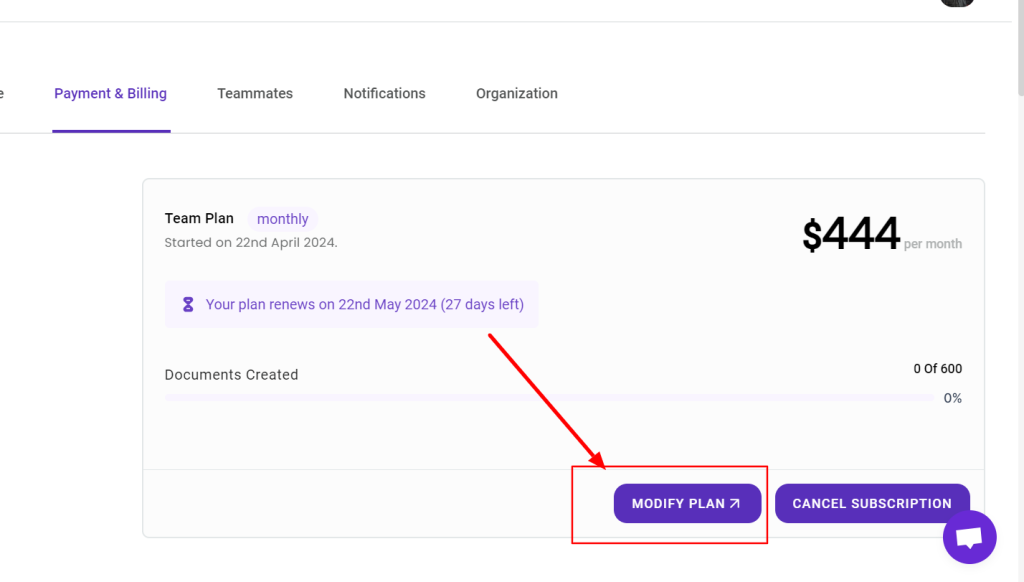
When you click on it, a new page will open.
Here, you can choose to upgrade or downgrade your plan. If you’re upgrading, you’ll be charged a prorated amount for the difference between your current plan and the plan you’re upgrading to.
If you’re downgrading, you’ll be issued a credit for unused time and that will be applied to your next payment.
You can also select the toggle at the top of the page and move between monthly and yearly pricing options. You can upgrade from monthly to yearly or downgrade from yearly to monthly.