

This guide explains the differences between regular seats and additional seats, and shows you how to add more seats to your plan. #
Within DoxFlowy, user seats are divided into two categories. The first category is seats that come with your plan. The second category is seats that you can purchase separately.
The seats included with your plan are listed in the account section of the billing page. You’ll see how many user seats have been taken up and the total number of user seats allocated to you based on the plan you’re on.
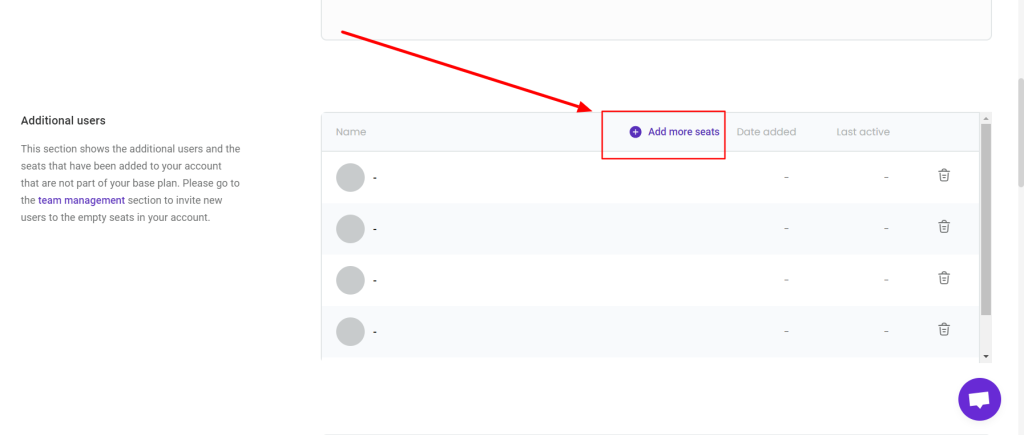
The additional user seats can be found below that.
By default, there are no additional user seats on your plan. Only the account users.
If you’ve already invited people to your account and need more seats, you’ll need to purchase more seats, which can be done in the additional user seats section of the billing page.
Navigate to the billing page by clicking the profile image dropdown at the top right of the page, then click on the billing option.
On the page that loads, scroll down until you see the additional user seats section.

To the right, you’ll see a chart that contains all the user seats you’ve purchased. Your chart should be empty. To get more seats, click the ‘add more seats’ option at the top of the chart.
When you click that, a modal will open up asking you how many seats you wish to purchase. Once you choose the number of seats you want, you’ll see how much you’ll be paying every billing cycle.
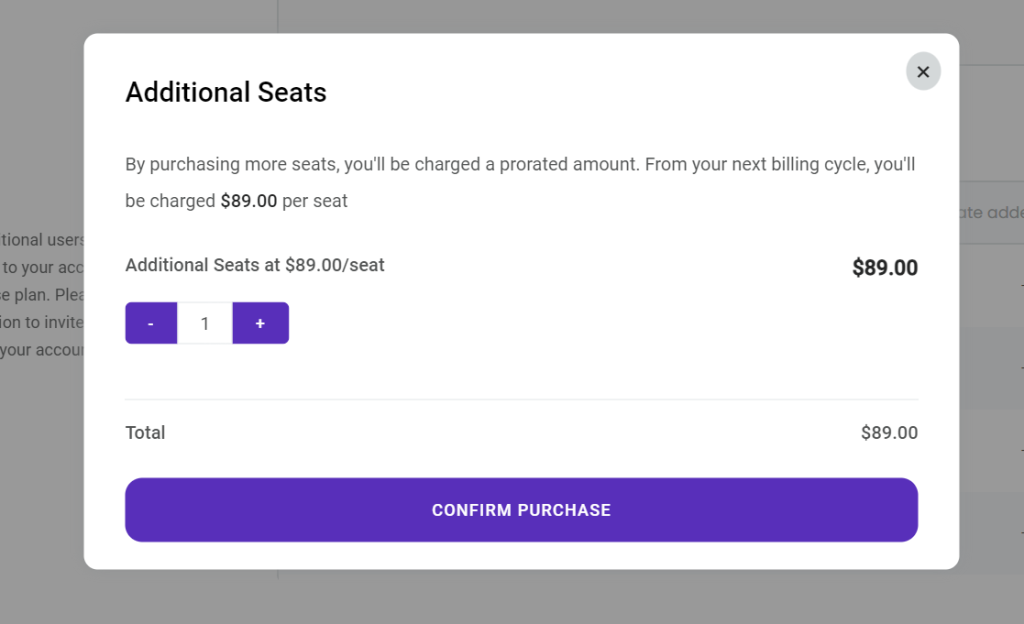
Please note that this is not the amount you’ll pay when you confirm the additional seats. Instead, you’ll pay a prorated amount immediately.